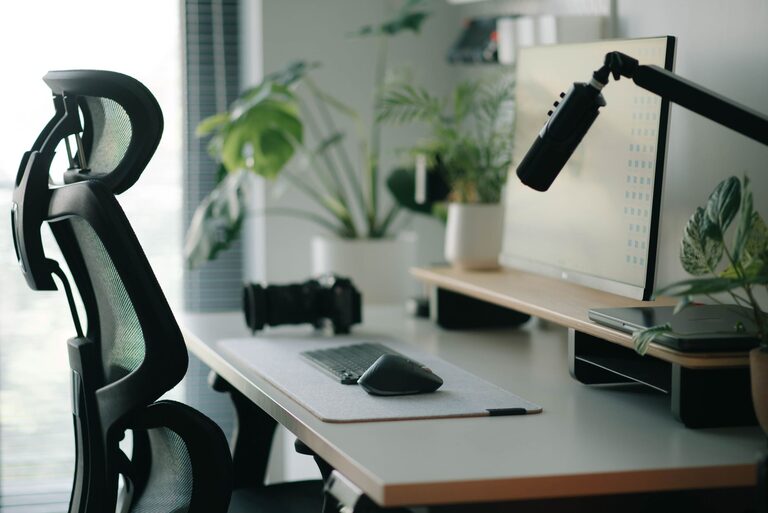
Creating an ideal desk setup is essential for maintaining focus and comfort throughout your workday. Whether you work from home, in an office, or study, a well-organized and ergonomic space can help reduce distractions, prevent discomfort, and improve productivity. In this post, we’ll share practical tips to help you optimize your desk setup for both comfort and concentration.
Why Your Desk Setup Matters
Your workspace environment can have a big impact on how well you focus and how comfortable you feel. Poor posture, clutter, or inadequate lighting can lead to physical strain and mental fatigue. By carefully arranging your desk and choosing the right tools, you create a supportive environment that encourages long periods of productive work.
Key Elements of a Focus-Friendly Desk Setup
1. Choose the Right Desk and Chair
– Desk height: Your desk should allow your arms to rest comfortably at about a 90-degree angle when typing. Adjustable desks are ideal for personalized comfort.
– Chair support: Invest in a chair with good lumbar support and adjustable height. Your feet should rest flat on the floor or a footrest.
2. Optimize Monitor Placement
– Position your monitor about an arm’s length away.
– The top of the screen should be at or slightly below eye level to avoid neck strain.
– If using multiple screens, place the primary one centered in front of you.
3. Manage Lighting
– Natural light is ideal, but avoid glare on your screen.
– Use a task lamp with adjustable brightness and positioning.
– Consider warmer light tones to reduce eye fatigue during long sessions.
4. Declutter and Organize
– Keep frequently used items within easy reach to minimize distractions.
– Use organizers, trays, or drawers to keep your desk tidy.
– Limit personal items on your desk to avoid visual clutter.
5. Incorporate Ergonomic Accessories
– A wrist rest can help you maintain a neutral wrist position while typing.
– A laptop stand lifts the screen to eye level and allows the use of an external keyboard.
– A document holder placed next to the monitor prevents frequent neck movements.
Tips to Improve Comfort and Focus
Create Zones for Different Tasks
Designate specific areas on your desk for certain activities—for example, a writing zone, a computer zone, and a space for reference materials. This helps you switch tasks smoothly and maintain focus.
Use Noise-Canceling Tools
If your environment is noisy or distracting, consider noise-canceling headphones or white noise machines to help you concentrate better.
Personalize with Plants and Decorations
Adding a small plant or a calm piece of art can create a pleasant atmosphere that supports mental well-being, but be sure to keep decorations minimal to avoid distractions.
Take Regular Breaks and Stretch
Setting a timer to remind you to stand, stretch, or walk every 30-60 minutes promotes circulation and reduces muscle fatigue.
Keep Hydrated and Have Healthy Snacks Nearby
Staying hydrated and snacking on nutritious foods can sustain your energy and attention.
Maintaining Your Desk Setup Over Time
– Weekly tidy-ups: Spend a few minutes at the end of the week organizing your workspace.
– Ergonomic check-ins: Reassess your posture and desk setup regularly to adjust for any discomfort.
– Update tools: Replace worn-out accessories that no longer support your comfort or productivity.
Conclusion
A well-thought-out desk setup is a powerful step toward improving your focus and comfort during work or study. By addressing ergonomics, lighting, organization, and personal preferences, you can create a workspace that not only supports your health but also helps you stay productive and motivated. Start with these simple changes and personalize your desk setup to suit your unique needs.
—
Optimizing your desk setup is an ongoing process. Take the time to experiment and find the arrangement that works best for you. Your body and mind will thank you!
About the Author